SEO and GEO under uncertainty: what to fix, what to bet on, what to skip
Nobody outside the AI companies knows exactly how assistants choose the pages they quote. Google’s own guide for AI search mostly says that good search engine optimization (SEO) still applies. Much of the advice sold as generative engine optimization (GEO) is guesswork with a price tag.
I decided not to wait for the rules. Instead, I sorted my options by how sure I could be that they pay off. Some changes help whatever AI search ends up rewarding. Some are cheap bets. A few are worth skipping on purpose.
Here is how I sorted them, with my advice for each group. I did much of the work myself; developers built the rest for me.
Fix these either way
These help classic search, AI answers, and human readers at the same time. They pay off in classic search today, whatever AI search ends up rewarding.
Make every important page readable as text
I made sure every important page is readable as raw text. Content that appears only after a click, sits behind a login, or loads late may never reach whatever reads your site. Google runs a page’s scripts before reading it; many AI crawlers don’t, and see only the raw page.
Ask your team: if a crawler fetches the raw page, does it see our key sentences?
Use real links, not click handlers
I made sure everything that leads somewhere is a real link. Cards and buttons that open the next page through a script, rather than a real link, give crawlers nothing to follow. Search engines, AI crawlers, and your own tools all read the same raw page, so one fix covers all of them.
Ask your team: is everything that leads somewhere on our site a real link?
Generate every machine copy from one source
llms.txt, markdown copies, and structured data are all extra copies of your facts, and copies kept by hand drift. We generate each one on publish from fields we already maintain:
| Copy | Generate it from |
|---|---|
llms.txt page list |
The sitemap, with each page’s meta description as its summary |
| Markdown copy of a page | The rendered HTML of that same page |
| Organization markup | One site-level settings record |
| Article markup | The post’s own title, date, author, and image fields |
Then we check every publish automatically, because editors change pages and new page elements appear. The rule is simple: each machine copy has the same title, intro, and links as its page.
Ask your team: is anything on our site maintained twice by hand?
Five rules for text that gets quoted
These are the rules I write by.
- Answer first. Open every page and section with the direct answer, then explain. An assistant that quotes only your first sentence should still get the point.
- Facts that stand alone. “It’s included in the paid plan” means nothing out of context. “CSV export is included in the Pro plan” survives being quoted alone.
- Questions as headings. People ask assistants questions. A heading phrased as the question, such as “Do I need an account?”, gives the answer under it an obvious match.
- One value per fact, from one source. Prices, limits, dates, and product names should come from a single place and match on every page. Models handle synonyms well. What they can’t resolve is two pages that disagree, such as 50 credits on one and 100 on another.
- Specifics, not judgments. “Searches titles, descriptions, tags, and web addresses” beats “smart search”. A specific claim can be quoted as a fact; a judgment can only be quoted as your opinion.
Keep a short list of words you don’t use, because they promise more than the product does. On one product it included “smart search”, “across devices”, and “archive”. Each implied a feature that didn’t exist.
When you use tables, write cells that make sense on their own
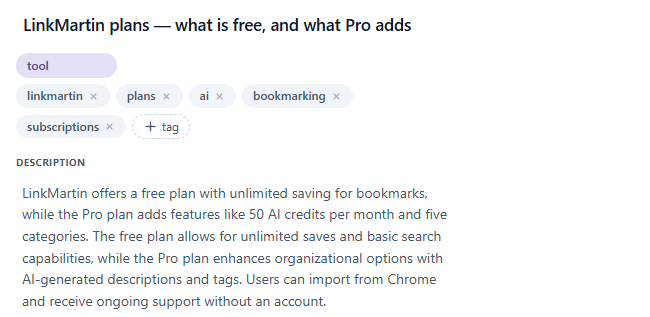
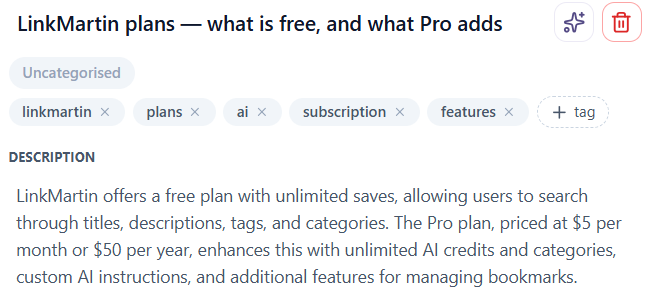
This one surprised me, and the evidence came from our own product. LinkMartin, the bookmark manager I’m building, writes a description for every page you save. When I saved our own pricing page, it wrote that the Pro plan “adds features like 50 AI credits per month and five categories”. Those are the Free plan’s limits. Pro removes them.
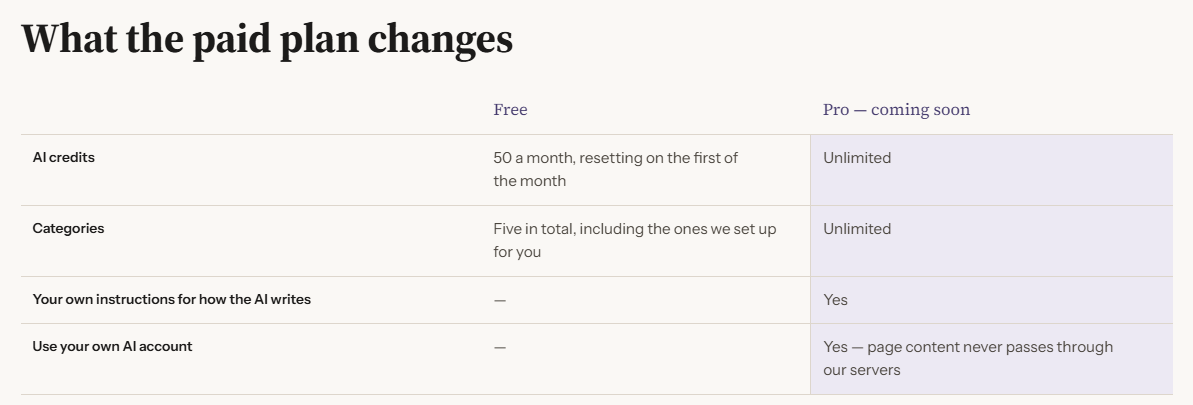
The page had a classic comparison table: features in rows, Free and Pro in columns. The cells held fragments like “50 a month, resetting on the first of the month”, “—”, and “Yes”. None of them said which plan it belonged to.
The fix was to give every cell a short sentence next to its value, one that names both the feature and the plan.
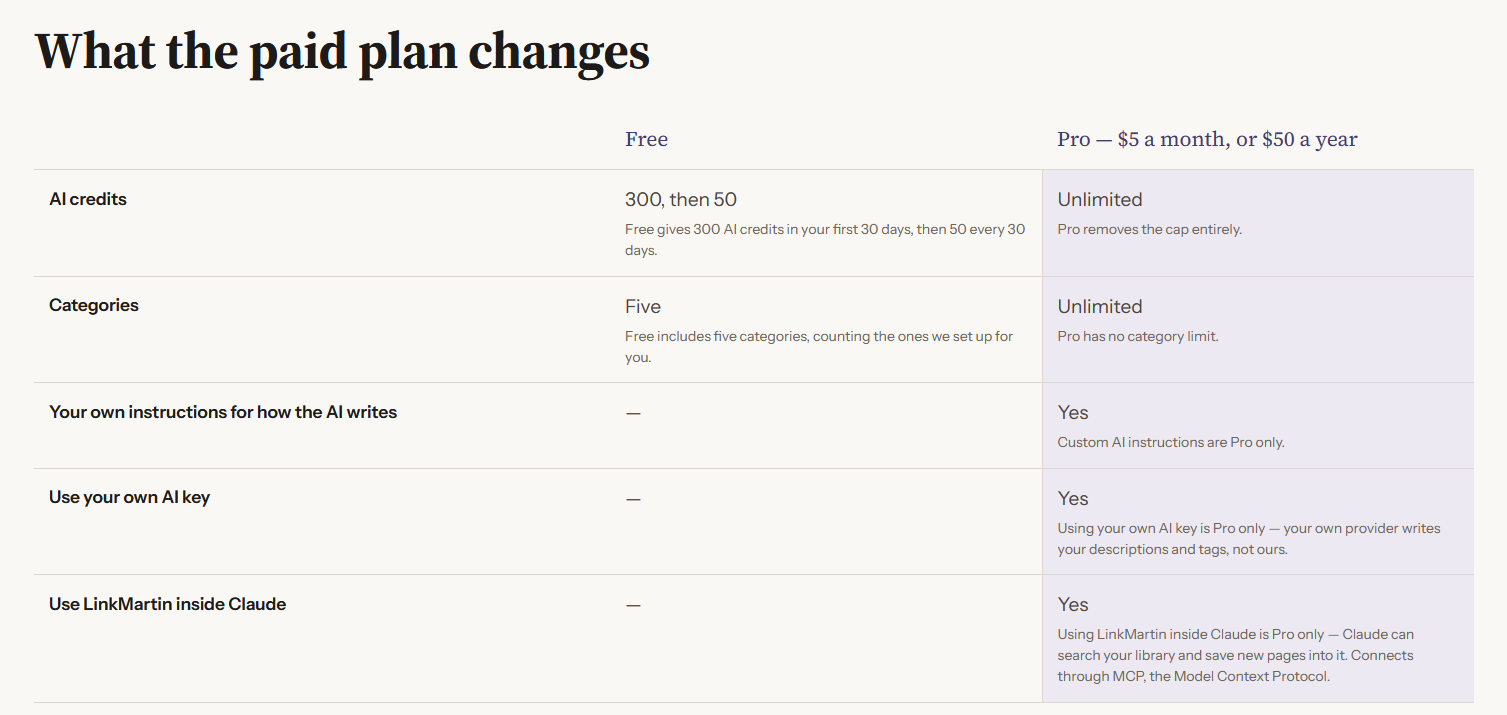
You can see it live on LinkMartin’s plans page.
The most likely reason: a bare value only means something next to its row and column headers. When a page is turned into text for a model, that link can break, and “50 a month” ends up attached to the wrong plan. A cell that says “Free includes five categories, counting the ones we set up for you” makes sense even in isolation. It is rule 2 from the list above, applied to tables.
Keep state pages out of the index
Welcome, thank-you, confirmation, and uninstall pages are states, not answers to a question. We mark them with a noindex tag, so neither search engines nor assistants send people into the middle of a flow.
Use noindex, not robots.txt, to keep a page out of search
Blocking a page in robots.txt stops crawlers from reading it. It doesn’t stop search engines from listing it. If that page also carries a noindex tag, nobody ever sees the tag, and the address can still show up in results as a bare link with no description. To keep a page out of the index, we let it be read and keep the noindex.
We also made the files agree. A section listed in the sitemap but blocked in robots.txt sends two opposite signals. The sitemap should also list each page exactly once, especially when other files are generated from it.
Ask your team: do robots.txt, the sitemap, and our noindex tags tell the same story?
Use Organization markup to say who you are
AI systems read pages as text and have to guess which words are a company name, an author, or a date. Organization markup states it outright: name, logo, offices, contacts, and links to your profiles on LinkedIn, YouTube, or a partner directory. Those links tie your site to the rest of your presence online. Google recommends putting this markup on your homepage or a single page about the company; it doesn’t need to be on every page. Blog posts can carry Article markup with the author and date, pointing back to the same organization.
In our Organization markup, we list only profiles that are filled in and link back to the site, and use clean addresses without tracking tags. An empty profile proves nothing.
Google says structured data isn’t required for AI search and earns no special AI bonus (Google). It still removes guesswork about who you are, for any system that reads it.
Markup never runs ahead of the page
Structured data should say only what the visible page says, in the same words. While LinkMartin’s paid plans were still “coming soon”, the paid offers came out of the markup. They went back in the day the prices appeared on the page. FAQ markup follows the same rule: copy the questions and answers word for word from the visible text. Engines cache markup you can’t recall, so anything that exists only there can outlive the decision behind it.
Check what search shows after launch
If a page went live with placeholder text, search engines may keep showing it long after you’ve replaced it. One launch page showed an old placeholder title in Google for a month, until a reindexing request in Search Console fixed it. Search for your key pages a week after launch, and request reindexing wherever what’s shown isn’t what’s there.
Bet on these, cheaply
These might help with AI answers. The evidence is thin, but so is the cost, so a small bet is reasonable. Just don’t report them to anyone as progress.
Keep existing FAQ markup, but don’t build new
Google stopped showing FAQ rich results in May 2026 (Google). The markup no longer buys anything visible in Google’s results. On one site I kept existing FAQ markup on pages that genuinely answer questions. It costs nothing to leave, and any system that reads structured data still gets a clean question-and-answer pair. On another site I dropped FAQ markup that was only planned. Both follow the same rule: keep what’s free, and don’t spend new work on an unproven bet.
It may still matter outside Google. Microsoft has said publicly that schema markup helps its language models understand content (Search Engine Land). Other AI providers haven’t said either way. Keep the visible questions and answers too: an assistant that opens your page directly may never see the markup at all.
Add llms.txt as insurance, not as a lever
llms.txt is a proposed file that gives AI systems a curated map of your key pages. Google Search ignores it, so it won’t help or hurt your rankings there (Google). That makes it a bet on AI crawlers, and independent trackers report that AI search bots barely request it (Ciela AI).
We added it anyway, because it’s cheap as long as nobody maintains it by hand. We wrote a short introduction once, and the list of pages is generated from the sitemap, with each page’s meta description as its summary. Then a renamed section can’t leave stale entries behind.
Offer markdown copies, at their own URLs
Plain markdown is easier for AI tools to parse than a full page with navigation, layout, and scripts. Google Search ignores it (Google), so treat it as a bet on AI crawlers.
We offer them. If you do too, give each copy its own address next to the page, for example the page’s address with .md on the end, and have the two point at each other: the page names its markdown copy, and the copy names the page as the original. Keep the copies out of the sitemap, which should list only real pages. Never switch between the two at one address depending on who’s asking. The next section explains why.
Then check that the copy is the same page. A common failure: the converter strips the page header to avoid copying the site navigation, and the headline and intro go with it.
Ask your team: if we offer markdown copies, does each one carry the same headline, intro, and links as its page?
Skip these on purpose
Two popular moves cost more than they give.
Different content for bots at the same URL
Serving markdown to recognized AI bots and HTML to everyone else, at the same address, sounds like a neat shortcut. It also matches the textbook description of cloaking: crawlers and people get different content from one URL (Google spam policies). Even before any penalty, it’s fragile. Many AI crawlers look like ordinary browsers, and one misread header sends markdown to the wrong visitor. I chose separate URLs: they give the same benefit with no switching logic to break.
Blanket rules for “AI bots”
One rule that blocks every AI bot treats three different jobs as one:
| Kind of bot | What it does | What blocking it costs you |
|---|---|---|
| Training crawlers | Collect pages to train future models | You stay out of what models learn |
| Search crawlers | Build the index assistants search when answering | Assistants can’t find your pages |
| On-request fetchers | Open a page when a person asks an assistant to | An assistant can’t read your page even when asked to |
Block the second or third group and you’ve undone everything else in this article. The first group is a real choice. Blocking it protects original material from being absorbed without attribution. Allowing it may help future models know that you exist, though nobody can show how much. I decided per group, and per provider.
Whichever way you go on training, record it as a decision, as I did. Inclusion in training data can’t be undone, and “we left it open on purpose” reads differently from “nobody got around to it”.
Ask your team: which AI bots does our site let in, and was that a decision or a default?
The rule underneath
Sort every recommendation by how sure you can be, then spend accordingly. Most of what reliably pays off sits in the first group. Most of that group is writing, not code.
That changes who owns the work. Indexing and markup belong to developers. Whether an assistant quotes you correctly depends on how your facts are written, and that belongs to whoever owns your copy. If GEO lives only in your engineering backlog, the most important layer has no owner.
Measure it, but measure it properly. AI answers vary from one run to the next, so asking an assistant once proves nothing. I started with a fixed panel of about 10 queries (your brand, your category, the problems you solve) and recorded a dated baseline. It’s a starting point, not a statistical sample. I rerun it monthly in Google, Bing, ChatGPT, and Perplexity.
Expect brand and category to move separately. Making engines understand who you are doesn’t put you into “best X” answers. That comes from third-party reviews and lists. Earning those, through reviews, references, and mentions on sites people already trust, is a separate workstream with its own plan.
Finally, I keep business numbers next to the panel. Being named in more AI answers matters only if it shows up in traffic, sign-ups, or leads.
For Google, Search Console now has a generative AI performance report (Google).
Next, I’ll put the tools that score a site’s “GEO health” through these three groups, and see which of them notice the text layer at all.
Sources
- Google Search Central: Optimizing for generative AI features (llms.txt, markdown, structured data, measurement)
- Google Search Central: documentation updates (FAQ rich results deprecated May 2026; llms.txt note added June 2026)
- Google Search Central: Organization structured data (where to place it)
- Google Search Central: spam policies (cloaking)
- Search Engine Land: Microsoft Bing/Copilot use schema for its LLMs (March 2025)
- Ciela AI: Do you actually need an llms.txt file? (March 2026)